
SnapsOS CLI
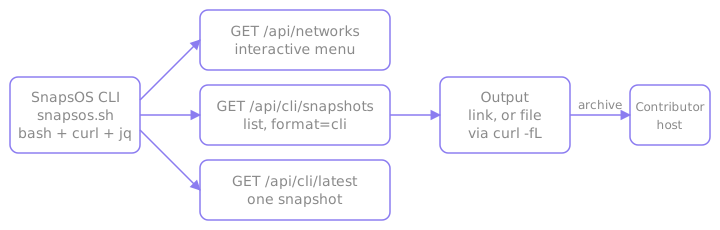
SnapsOS is a terminal client for the SnapsVault snapshot data. It is a single bash script, cli/snapsos.sh, that calls the REST API.
There are two ways to use it:
- Interactive mode: a menu to pick a snapshot, then view its link or download it and check its checksum
- Flag mode: one command with flags prints a link or a list, for scripts and servers
Install
Download the script and run it with bash:
bash
curl -fsSL https://snapsvault.xyz/snapsos.sh -o snapsos.sh && bash snapsos.shWhere the script comes from
The download link serves the current version of cli/snapsos.sh from the main branch of the SnapsVault repository.
Read it before it runs
The script is plain bash. Download it, review it, then run it:
bash
curl -fsSL https://snapsvault.xyz/snapsos.sh -o snapsos.sh
less snapsos.sh
bash snapsos.sh| Requirement | Used for |
|---|---|
bash, curl, jq, tr | Required. The script checks them on start. |
sha256sum, or shasum on macOS | The checksum check |
tput, awk | Styling only |
The examples below assume snapsos.sh is in the current directory.
First command
Print the newest mainnet Celestia snapshot:
bash
bash snapsos.sh -n Celestia --latestThe output is two lines, a summary and the download URL:
text
Celestia mainnet #<height> by <contributor> (<type>) - <size>
<download URL>
Interactive mode
bash
bash snapsos.shThe menu fetches /api/networks and asks in order for network, chain ID, type, then a snapshot from a table (height, type, size, time, contributor). A step with a single option is selected automatically. Entering b, back or 0 goes back. After a snapshot is chosen:
| Choice | Action |
|---|---|
| 1) View link | Prints the URL, waits for Enter, returns to the same menu |
| 2) Download | Runs curl -fL -o <filename> in the current directory, checks the SHA256, then exits |
How the saved file name is chosen
The saved file name is the one the API reports, which is the last segment of the download URL. The script uses it only when it is a plain name: not empty, no /, no control characters and not starting with . or -. Otherwise it takes the last segment of the download URL under the same rules, and snapshot.bin when that fails too.
Flag mode
All filtering and sorting happens in the API. The exit code is 0 on success and 1 otherwise.
--latest uses GET /api/cli/latest for the newest snapshot. Without it, the script uses GET /api/cli/snapshots?format=cli and prints the first --limit rows.
bash
bash snapsos.sh -n Celestia -t archive --latest     # newest snapshot
bash snapsos.sh -n Celestia -i mocha-5 --latest     # newest mocha-5 testnet snapshot
bash snapsos.sh -n Celestia -m 5                    # list 5 snapshots
bash snapsos.sh -n Celestia --latest -q             # only the URL, for piping
How the chain is chosen
With -i and no -c, the chain follows from the chain ID, so -i mocha-5 selects testnet. With neither, --latest uses mainnet. List mode does not default the chain, so it lists mainnet and testnet snapshots together unless -c or -i narrows them. Each list row is the same two lines, separated by a blank line. -c, -i and -t are case-insensitive.
Download from flag mode
Flag mode prints the link. Combine -q with curl to download. The file name comes from the URL, so the extension matches the snapshot file format:
bash
url=$(bash snapsos.sh -n Celestia --latest -q)
curl -fL -o "$(basename "$url")" "$url"
A download this way is not checked automatically. Check it with --verify.
Verify a download
After an interactive download, the script checks the file against the SHA256 checksum the contributor publishes for the snapshot. The hash is computed with sha256sum, or shasum -a 256 where sha256sum is missing, as on macOS. --no-verify skips the check.
Results and exit codes
| Result | Output | Exit code |
|---|---|---|
| Hash matches | SHA256 match: <hash> | 0 |
| Hash differs | Error: SHA256 mismatch. plus the expected and the actual hash | 1 |
| No checksum published | No SHA256 is published for this snapshot, so the file was not checked. | 0 |
| Published hash malformed | Error: The published SHA256 is not 64 hex characters, so the file was not checked. | 1 |
| Hash tool missing | Error: Neither sha256sum nor shasum is installed, so the SHA256 was not checked. | 1 |
--no-verify given | SHA256 check skipped (--no-verify). | 0 |
Mismatch
On a mismatch, the downloaded file is not safe to extract. The Quickstart says what to do next.
Verify a file on disk
To check a file that is already on disk, pass the expected hash from the snapshot page:
bash
bash snapsos.sh --verify "$(basename "$url")" --sha256 <sha256>--verify makes no API request. It exits 0 on a match and 1 on a mismatch, a missing file, a path that is not a regular file, a malformed hash or a missing hash tool.
Flags
| Flag | Default | Meaning |
|---|---|---|
-n, --network NAME | none | Network, for example Celestia, case-insensitive. Its presence selects flag mode. |
-c, --chain NAME | the chain of -i | Chain, mainnet or testnet, case-insensitive. Without -c and -i, --latest uses mainnet and a list shows both chains. |
-i, --chain-id ID | none | Chain ID, for example celestia or mocha-5, case-insensitive |
-t, --type TYPE | none | Snapshot type, for example pruned or archive, case-insensitive |
-l, --latest | off | Resolve only the newest snapshot |
-m, --limit NUM | 15 | Rows to print in list mode. A positive integer. |
-q, --quiet | off | Print only the download URL or URLs |
--no-verify | off | Skip the SHA256 check after an interactive download |
--verify FILE | none | Check a file on disk against --sha256, then exit. Makes no API request. |
--sha256 HEX | none | Expected SHA256 for --verify, 64 hex characters |
--api-base URL | https://celestia.snapsvault.xyz | API address. Env: SNAPSV_API_BASE. A trailing slash is removed. |
-h, --help | Print help and exit |
Flag combinations and environment
Flag mode starts with -n. --verify runs on its own and is rejected with an error when combined with -n, -c, -i, -t, -l, -m or -q (or their long forms). Using -c or -i without -n exits with an error. With none of these flags, the script opens interactive mode.
Requests time out after 20 seconds. Times are printed in UTC. NO_COLOR disables color, and output degrades on a non-terminal.
Next steps
- Quickstart: verify and restore a node from the downloaded snapshot file
- REST API: the routes the script calls
- Feedback: report a problem or suggest an improvement